































On this page8 sections
Company background
Trezor grew out of the Prague hackerspace brmlab, where Marek Palatinus and Pavol Rusnák met in 2011. SatoshiLabs also lists Slush Pool, which it describes as the first bitcoin mining pool, among its innovations. Trezor was founded in 2013 and the company calls its 2014 Model One "the world's first hardware wallet." The company website describes the business as 100% self-owned. (Trezor company page, SatoshiLabs, Pavol Rusnák)
Trezor Company s.r.o. is the legal operator named in the site's copyright line and terms, registered at Kundratka 2359/17a in Prague 8 under company ID 02440032. (Trezor terms of use) It sits inside SatoshiLabs Group, a Czech holding whose other companies include Invity (a bitcoin buying app), Tropic Square (a secure-chip semiconductor firm) and Vexl (a peer-to-peer bitcoin trading app without KYC).
Current and legacy devices
Trezor sells three device families as of October 2026, each with a universal and a Bitcoin-only version. The older Model One is listed in the official store as discontinued.
| Safe 3 | Safe 5 | Safe 7 | |
|---|---|---|---|
| Screen | 0.96" monochrome OLED, 128×64 | 1.54" color touchscreen, 240×240, haptics | 2.5" color touchscreen, 520×380 |
| Input | Two buttons | Touch | Touch |
| Secure element | EAL6+ certified | EAL6+ certified | TROPIC01 plus an EAL6+ element (dual) |
| Connection | USB-C | USB-C | USB-C, Bluetooth, Qi2 wireless charging |
| Body | PMMA plastic, 14 g | PC-ABS plastic | Aluminum unibody |
| Battery | None | None | LiFePO₄, 330 mAh |
| Extras | FIDO2 / 2FA use | microSD slot, FIDO2 | Post-quantum signed firmware and boot |
Sources: Trezor compare page, Safe 3, Safe 5, Safe 7.
Trezor Safe 7
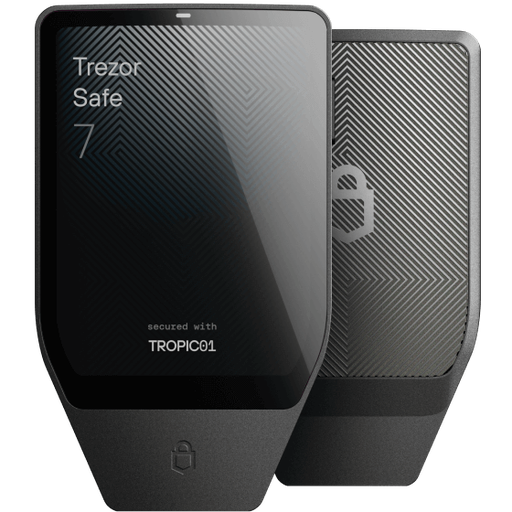
The Safe 7 launched on October 23, 2025 at $249 (€249). Its headline change is the TROPIC01 secure element, which the company calls the first auditable secure element because its design is open for public inspection. It is paired with a second, conventionally certified secure element and an STM32U5 microcontroller from a third vendor, so no single chip supplier controls the whole security chain. Trezor also states that it uses post-quantum cryptography for firmware updates, device authentication and boot. The device adds Bluetooth for phone use, which can be turned off in settings. (Safe 7 launch release, October 23, 2025)
Trezor Safe 5 and Safe 3
The Safe 5 is the mid-range touchscreen model; the Safe 3 is the compact two-button model and the entry point to the Safe line. Both use a certified secure element with PIN and passphrase protection, both support coin control and Tor in Suite, and both can act as a FIDO2 security key. Prices are set in the official store and vary by region and promotion.
How a Trezor protects your keys
A Trezor generates the wallet's private keys on the device and never sends them to the computer or phone. The app prepares a transaction, the device displays the details, and you confirm on the device before it signs. Malware on a connected computer can propose a bad transaction, but cannot sign one without your physical confirmation.
What protects what:
- PIN stops someone who picks up the device from using it.
- Secure element resists physical extraction attempts on the stored secret.
- Wallet backup (12, 20 or 24 words, or a Multi-share Backup that splits the backup across several shares) is what restores funds on a new device if the original is lost, broken or stolen.
- Optional passphrase creates hidden wallets; losing it means losing access to those wallets, and Trezor cannot recover it.
What it does not protect against: signing a malicious transaction you approve, a backup photographed or typed into a website, address-poisoning tricks that get you to send to a lookalike address, or fake "Trezor support" asking for your recovery words. OBOL's hardware wallet setup guide and seed phrase security guide cover safe backup practice.
Trezor Suite and supported coins
Trezor Suite is the official companion app. As of October 2026:
- Desktop offers the full feature set: send and receive, buy, sell and swap through integrated third-party providers, and staking for Ethereum, Cardano and Solana.
- Android is fully compatible with all Trezor devices.
- iOS supports full signing only with the Safe 7 over Bluetooth; with other models the iOS app is limited to portfolio tracking, buying and receiving.
- Privacy and safety features include coin control, Tor, a custom backend option, discreet mode, address-poisoning and scam-airdrop protection, and MEV protection.
Suite's buy, sell and swap features route through outside providers, whose fees and KYC rules apply; the Suite page does not list any Trezor fee for these services. (Trezor Suite)
Coins. Trezor says its devices support thousands of coins and tokens. Bitcoin and Ethereum (including dozens of EVM networks) work on all models; Solana, Cardano and XRP are supported on some models; some assets, such as Monero, require third-party wallet software. Check the official coin list for a specific token and model before buying.
Buying safely
Buy from the official Trezor store or authorized resellers listed by Trezor, not from marketplace sellers. A tampered or pre-configured device is a known theft method: create the wallet backup yourself during setup, and do not use any device that arrives with recovery words already filled in. For broader context on how hardware wallets differ from app wallets, see OBOL's crypto wallets 101.
Security incidents and phishing history
The most significant recent incident involved customer data rather than devices. On January 17, 2024, Trezor detected unauthorized access to the third-party ticketing portal it used for support. Names or nicknames and email addresses of up to 66,000 people who had contacted support since December 2021 may have been exposed; the attacker emailed 41 users asking for their recovery seeds. Trezor said no funds or devices were compromised, no seed phrases were disclosed, and postal addresses and phone numbers were not exposed. (Trezor blog, January 19, 2024)
The practical lesson: emails or messages claiming to be from Trezor can look legitimate. Trezor support does not need your recovery words for anything. If you have already entered them somewhere, follow OBOL's compromised wallet first-hour guide.
Support
Trezor's support hub at trezor.io/support has troubleshooting, logistics and device articles plus a contact option; community help is on the official forum at forum.trezor.io. Support can help with orders, shipping and device issues but cannot recover funds from a lost backup.
OBOL has assessed two models separately: OBOL's Trezor Safe 5 review and OBOL's Trezor Safe 3 review. Other devices are compared on the hardware wallets ratings hub.
Official channels
Confirmed on trezor.io on October 19, 2026:
- Website and shop: trezor.io
- X: twitter.com/trezor
- GitHub: github.com/trezor
- YouTube: youtube.com/@TrezorWallet
- Reddit: reddit.com/r/TREZOR/
- Instagram: instagram.com/trezor.io/
- Facebook: facebook.com/trezor.io/
- Forum: forum.trezor.io
- Support: trezor.io/support
How OBOL rates Trezor (Trezor Company s.r.o., SatoshiLabs Group)
This page explains the company. The scores live in the reviews.
FAQ
Who owns Trezor?
Can I lose my crypto if my Trezor breaks?
Does a Trezor work with an iPhone?
Is the Trezor Model One still sold?
Sources
checked 19 October 2026- 1Trezor — company pagetrezor.io
- 2Trezor — terms of usetrezor.io
- 3Trezor — comparetrezor.io
- 4Trezor — Safe 7trezor.io
- 5Trezor — Safe 5trezor.io
- 6Trezor — Safe 3trezor.io
- 7Trezor — Trezor Suitetrezor.io
- 8Trezor — coinstrezor.io
- 9Trezor — storetrezor.io
- 10Trezor — supporttrezor.io
- 11Trezor blog — security alertblog.trezor.io
- 12SatoshiLabs — group overviewsatoshilabs.com
- 13Pavol Rusnák — aboutrusnak.io
- 14Trezor press release via HackerNoon — Safe 7 launchhackernoon.com